

基准测试
Zvec 专为速度、规模与效率而设计,已在阿里巴巴的大规模生产负载中经受充分检验。
Zvec 专为速度、规模和效率而设计 — 并已在阿里巴巴集团严苛的生产负载中经过了实战检验。
下文将展示 Zvec 在不同工作负载和配置下的基准测试结果。
所有测试均在受控环境中进行,采用标准化数据集和业界公认的方法,以确保公平性、透明度和可复现性。
性能评测
我们使用 VectorDBBench 对 Zvec 进行评估。VectorDBBench 是一个开源的向量数据库基准测试框架。
我们的评估主要基于以下两个标准数据集:
- Cohere 1M:100万条 768 维向量
- Cohere 10M:1000万条 768 维向量
对于每个数据集,我们测量以下关键性能指标:
- 每秒查询数(QPS):持续负载下的吞吐量。
- 召回率:最近邻检索的准确度,反映搜索质量。
- 索引构建时间:完整数据集的导入和构建索引所需的时间,反映数据导入效率。
Cohere 10M 基准测试结果
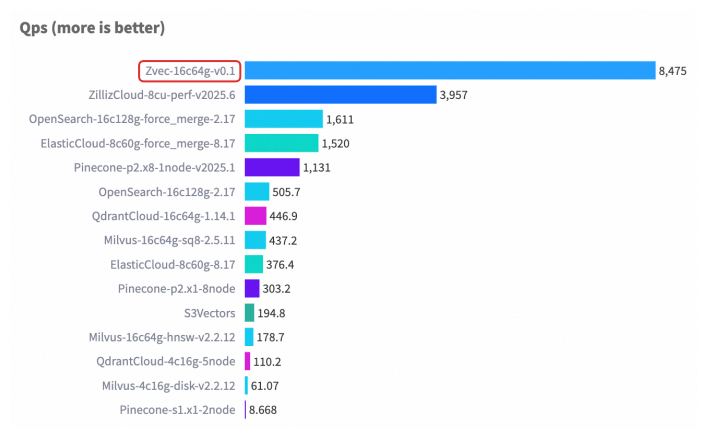
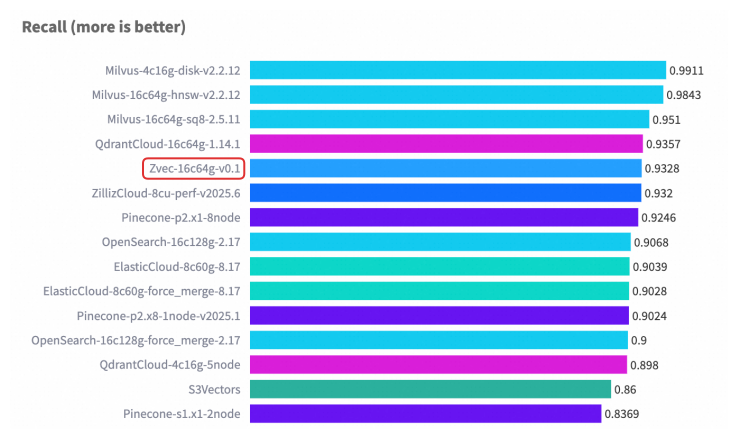
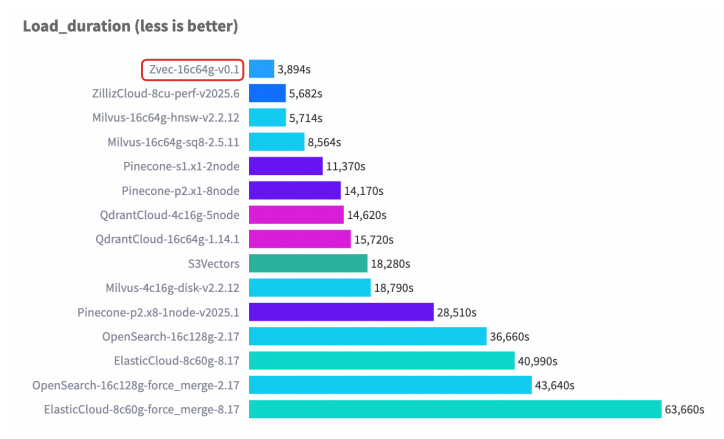
Cohere 1M 基准测试结果
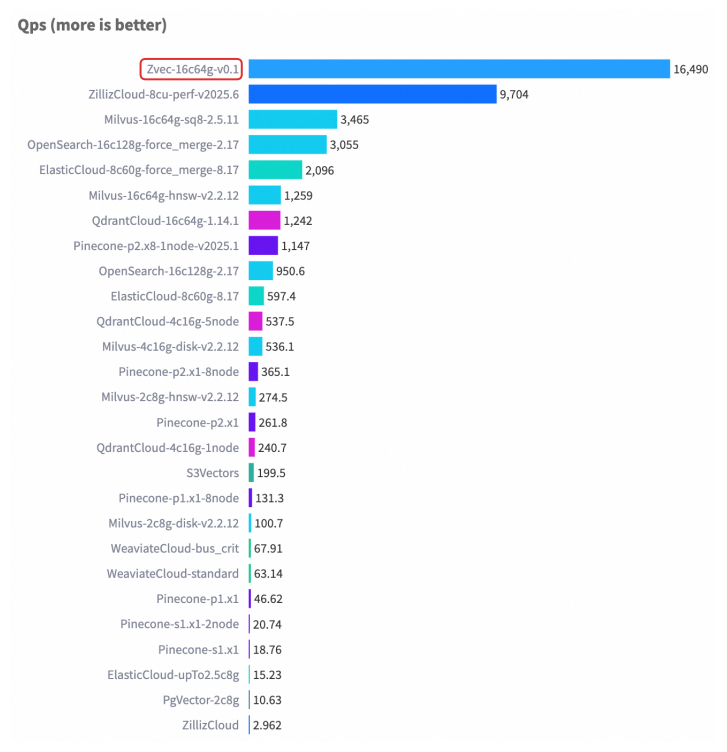
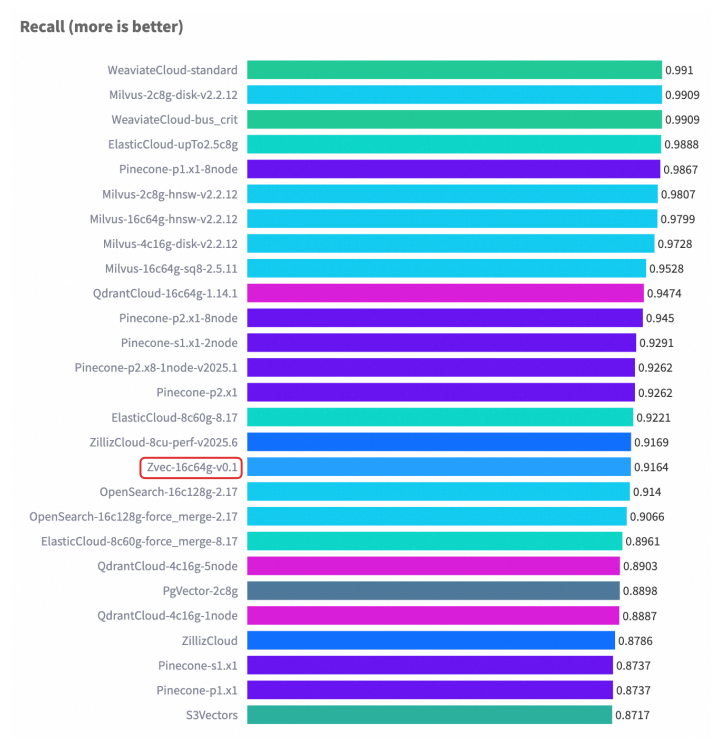
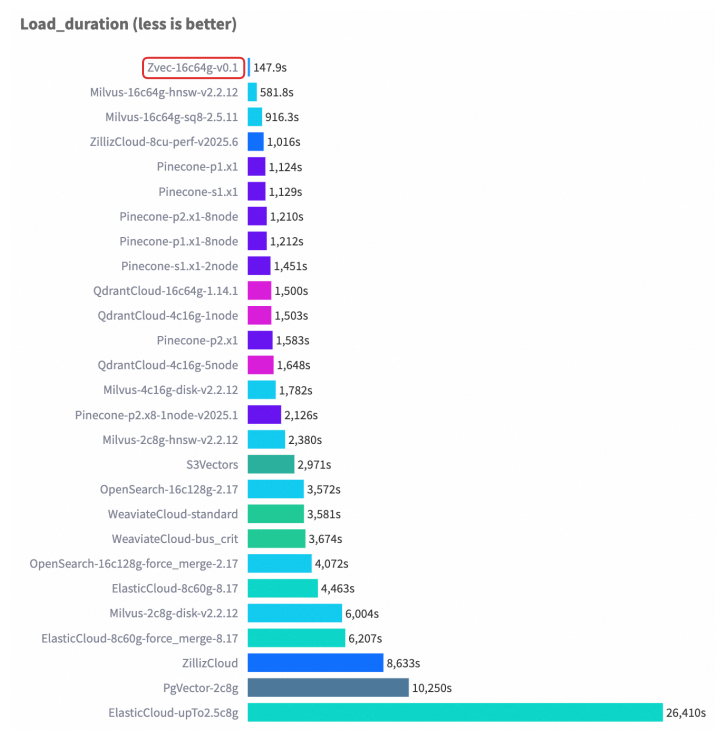
复现基准测试结果
请按照以下步骤复现我们的基准测试结果。
准备环境
-
启动 ECS 实例
我们推荐使用 Ubuntu 24.04 作为操作系统。如果使用其他操作系统,有可能需要调整复现步骤中的命令。
- 参考此指南,创建一个 g9i.4xlarge 实例(16 vCPU,64 GiB 内存)。
-
安装系统依赖
-
如尚未安装 git,请先安装
apt-get update apt install git -
安装 Python3.11 或更高版本
apt-get update
apt install python3-full python3-venv python3-dev

cd /opt
python3 -m venv venv
source venv/bin/activate
-
-
# Clone VectorDBBench git clone https://github.com/zilliztech/VectorDBBench.git cd VectorDBBench # Install deps pip install -U pip pip install -e . # 如遇下载缓慢或连接问题,可尝试使用阿里云 PyPI 镜像 # pip install -U pip -i https://mirrors.aliyun.com/pypi/simple # pip install -e . -i https://mirrors.aliyun.com/pypi/simple -
安装 Zvec
pip install zvec==v0.1.1
运行基准测试
Cohere 10M
-
构建索引
vectordbbench zvec --path Performance768D10M --db-label 16c64g-v0.1 --case-type Performance768D10M --num-concurrency 12,14,16,18,20 --quantize-type int8 --m 50 --ef-search 118 --is-using-refiner -
运行测试
vectordbbench zvec --path Performance768D10M --db-label 16c64g-v0.1 --case-type Performance768D10M --num-concurrency 12,14,16,18,20 --quantize-type int8 --m 50 --ef-search 118 --is-using-refiner --skip-drop-old --skip-load
Cohere 1M
-
构建索引
vectordbbench zvec --path Performance768D1M --db-label 16c64g-v0.1 --case-type Performance768D1M --num-concurrency 12,14,16,18,20 --quantize-type int8 --m 15 --ef-search 180 -
运行测试
vectordbbench zvec --path Performance768D1M --db-label 16c64g-v0.1 --case-type Performance768D1M --num-concurrency 12,14,16,18,20 --quantize-type int8 --m 15 --ef-search 180 --skip-drop-old --skip-load