

Inverted File Index (IVF)
A scalable, partition-based, memory-efficient index designed for massive, naturally clustered datasets — at the expense of slower indexing and tuning.
How It Works
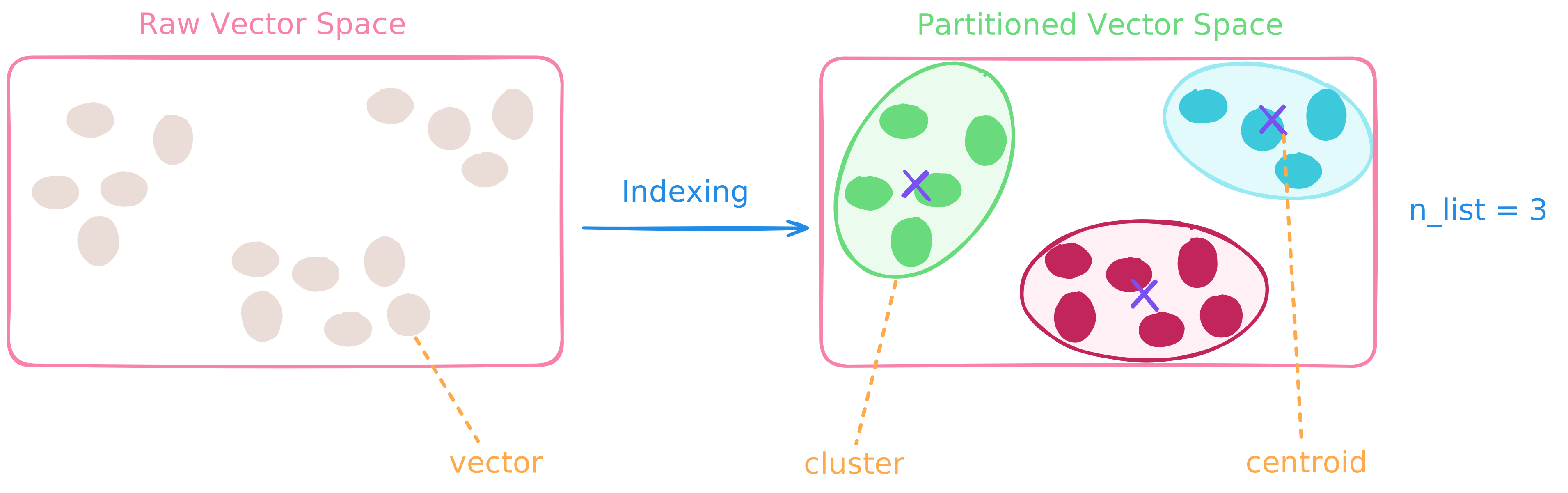
IVF operates by partitioning the entire vector space into clusters. The number of clusters is controlled by the parameter n_list (short for "number of lists").
Indexing Phase ⚙️
-
Clustering: The algorithm first applies a clustering algorithm, creating
n_listclusters. Each cluster is represented by its centroid — a central point that best represents all vectors assigned to that cluster. -
Assignment: Each vector in the dataset is assigned to the cluster whose centroid is closest to it. The vector is then stored in an inverted list (also called a "bucket") associated with that centroid. The index essentially becomes a mapping from centroids to their associated vectors.
Query Phase 🔍
-
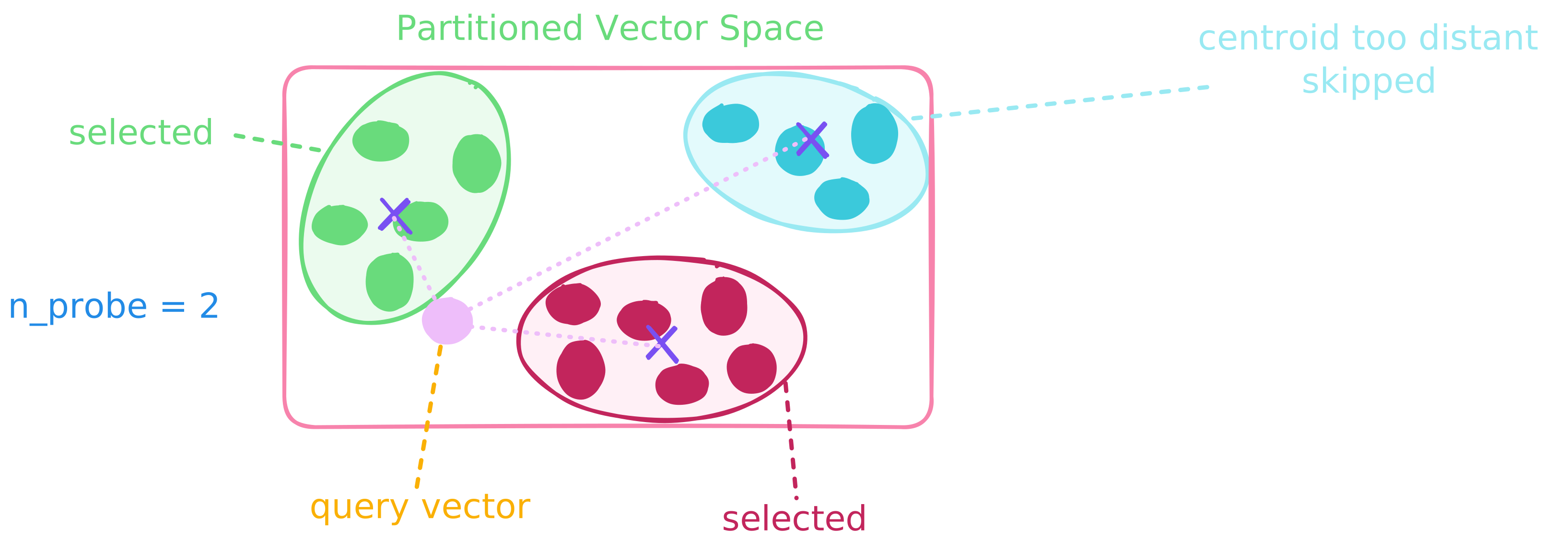
Centroid Selection: When a query vector arrives, the system first computes distances between the query and all
n_listcentroids to identify then_probenearest centroids (n_probeis a parameter that controls how many centroids to consider). -
Local Search: Instead of scanning the entire dataset of
Nvectors, the search is restricted to only the vectors stored in then_probeselected buckets. A brute-force (or refined) search is then performed within those buckets to find the nearest neighbors.
When to Use an IVF Index
- ✅ Your vector dataset exhibits natural clustering or locality structure
- ✅ You're working with very large datasets and memory efficiency is critical
- ✅ You need to tune parameters to achieve optimal performance
Best Practice:
- IVF works best on datasets with inherent clustering structure.
- For even greater memory efficiency and scalability, combine it with Product Quantization (PQ).
- The performance of IVF is highly sensitive to parameters like
n_list. As such, IVF is best suited for practitioners who can systematically experiment with, validate, and optimize these settings for their specific data distribution and latency-recall requirements.
Advantages
- ✨ Compatibility — Often used as a base layer in composite indexes (e.g., IVF-PQ) for further optimization
- ✨ Scalability — Query time scales approximately as O(N /
n_list×n_probe), making it highly efficient for largeNwhenn_listis large andn_probeis small - ✨ Memory Efficiency — Stores vectors in compact inverted lists with minimal overhead from centroids and list pointers, typically uses significantly less memory than graph-based methods like HNSW
Trade-offs
- ⚠️ Indexing Overhead — Building the index requires clustering, which can be computationally intensive and slower to build than indexes like HNSW
- ⚠️ Parameter Sensitivity — Accuracy and latency are highly dependent on the choice of
n_listandn_probe
Key Parameters
Index-Time Parameters
| Parameter | Description | Tuning Guidance |
|---|---|---|
metric_type | Similarity metric used to compare vectors | Choose based on how your embeddings were trained |
n_list | Number of clusters (inverted lists) — the vector space is partitioned into this many clusters during indexing | • Start with n_list ≈ , where N is the number of vectors • Larger n_list → ✨ finer partitioning, smaller buckets, faster search — but ⚠️ higher indexing cost and more centroids to manage • Smaller n_list → ✨ faster index construction — but ⚠️ larger buckets and slower search |
n_iters | Centroid refinement iterations — number of passes to optimize cluster centroids during indexing | • Higher n_iters → ✨ better clustering quality ⚠️ longer index build time |
quantize_type | Vector quantization method to apply Defaults to no quantization | See Quantization for more details |
Query-Time Parameters
| Parameter | Description | Tuning Guidance |
|---|---|---|
n_probe | Number of clusters to search at query time — the system retrieves candidates only from these nearest clusters. | • Higher n_probe → ✨ higher recall ⚠️ slower queries |
radius | Distance (similarity) threshold for range-based filtering — only documents satisfying the threshold are returned | Example: • With inner product MetricType.IP, set radius=0.6 to keep only results with score > 0.6 ✅ Use when: You want to filter out low-quality matches 🚫 Skip when: You want all top-k results, regardless of quality |
is_linear | Forces a brute-force linear search instead of using the index | 🐌 Very slow for large datasets! ✅ Only use for: Debugging, tiny collections, or verifying index accuracy |
DiskANN Index
A disk-based graph index for billion-scale approximate nearest neighbor search, delivering high recall with a much smaller memory footprint at the cost of lower QPS.
IVF-RaBitQ Index
Combines IVF clustering with RaBitQ quantization to reduce both the search scope and vector storage, making it suitable for large-scale approximate vector search under constrained memory budgets.