

Data Modeling
In Zvec, data is organized into collections and documents.
Collections
A collection is a named container for documents — similar to a table in a relational database system such as MySQL, where each document represents a row in a table. A collection is where you store, organize, and query your data.
Every collection is governed by a schema that defines the scalar fields and vectors it contains, along with their types and indexing settings.
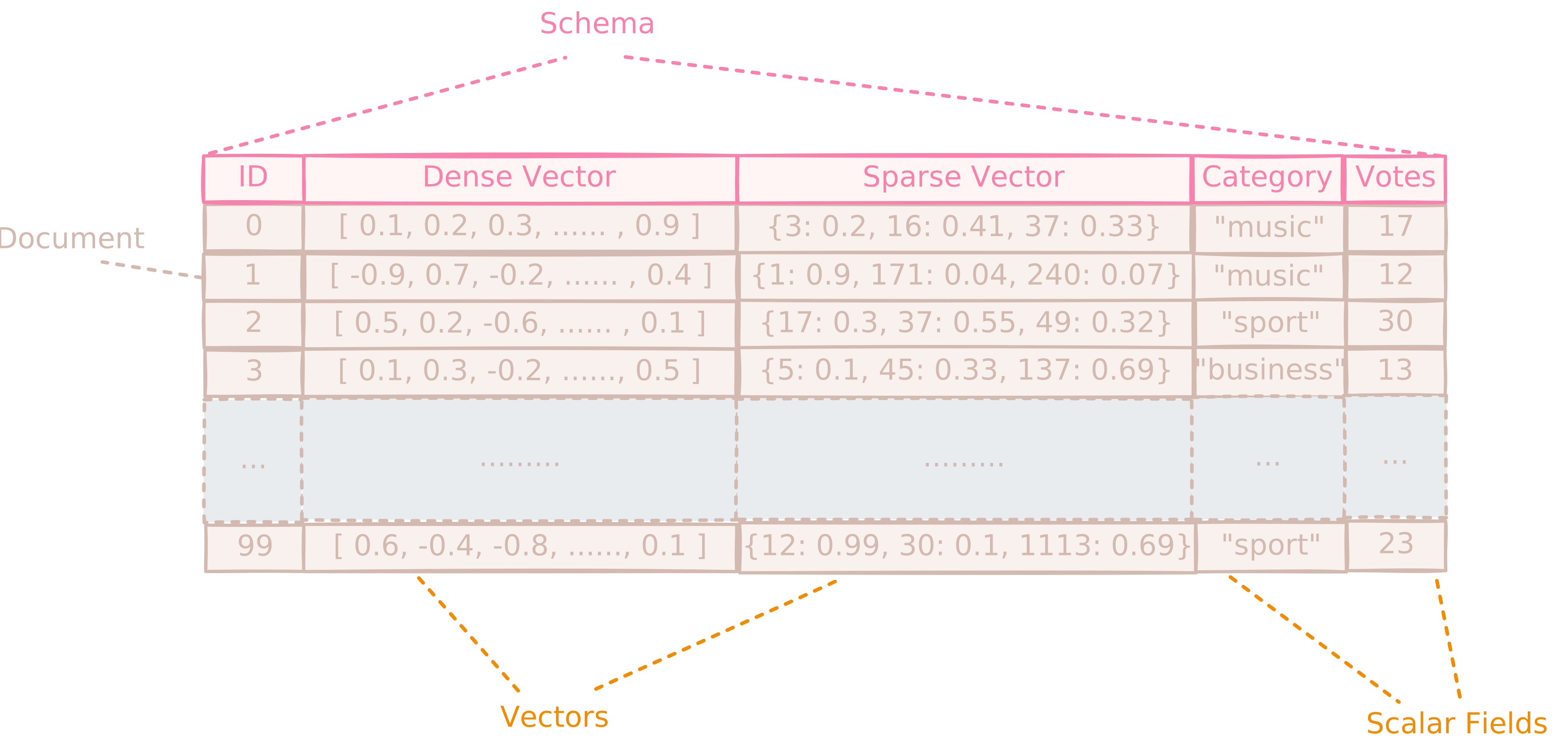
All documents within a collection conform to the same schema.
The schema in Zvec is dynamic: you can add or remove scalar fields and vectors at any time without recreating the collection.
No cross-collection queries: Joins, unions, or multi-collection searches are not supported. Design your data model accordingly.
Why Use Collections?
Collections provide isolation by ensuring that each data workload operates within its own dedicated schema and indexing configuration. This separation prevents interference between unrelated use cases and allows each to evolve independently.
For example:
- A Retrieval-Augmented Generation (RAG) collection might store text embeddings together with metadata — such as title, section, source URL, and last-updated timestamp.
- An image search collection could hold high-dimensional image embeddings along with associated fields like image ID, file path, or caption.
Persistence
-
Each collection is persisted independently on disk in its own dedicated directory, providing isolation between different data workloads.
-
Each collection is self-contained within its directory. This means you can relocate a collection's directory and Zvec will still be able to open it when provided with the correct path.
Documents
A document is the fundamental unit of data storage — think of it as a single record or row in a relational database table. Each document lives inside a collection and must conform to that collection's schema.
Structure of a Document
A document is a structured object composed of three core components.
- 🔑
id: A unique string identifier for the document, cannot be changed after insertion - 📐
vectors: A named set of vectors - 🗂️
fields: A named set of scalar (non-vector) fields, which can include strings, numbers, booleans, or arrays of these types
Example Document
All fields must conform to their declared types in the schema. Vectors must exactly match the specified type (dense or sparse) and dimensionality (e.g., a 768-dimensional dense vector cannot accept a 512-dimensional vector).
Data Types
Zvec uses a strongly typed schema system based on the DataType enumeration. The supported types fall into two categories:
- Scalar types — strings, integers, floats, booleans, and arrays of these types
- Vector types — dense or sparse numeric representations for vector embeddings
Type safety is enforced at ingestion: each document field must conform to its corresponding declared DataType.
Scalar Types
-
Elementary Types
STRINGBOOLINT32INT64UINT32UINT64FLOATDOUBLE -
Array Types
ARRAY_STRINGARRAY_BOOLARRAY_INT32ARRAY_INT64ARRAY_UINT32ARRAY_UINT64ARRAY_FLOATARRAY_DOUBLEArrays cannot contain mixed types or nested structures. All elements must match the declared array element type.
Vector Types
-
Dense Vector Types:
represented as fixed-length numeric arrays, e.g.,[0.1, -0.5, ..., 0.9]VECTOR_FP16VECTOR_FP32VECTOR_INT8 -
Sparse Vector Types:
represented as maps from integer indices to float values, e.g.,{ 42: 0.85, 1024: 0.13 }SPARSE_VECTOR_FP32SPARSE_VECTOR_FP16
Indexes
Indexes accelerate data retrieval beyond basic storage of scalar fields and vectors. In Zvec:
- Every vector field must be indexed using an appropriate vector index to enable similarity search.
- Scalar fields are optionally indexed — but you should build inverted indexes on any scalar field you plan to use in filtering queries (e.g.,
WHERE category = 'music').
You can define indexes at collection creation by specifying index_param in the schema for each field or vector.
Alternatively, you can add indexes after collection creation by calling create_index() dynamically — no data re-ingestion required.
import zvec

# Define the collection schema with one scalar field and one vector field, both
# configured with indexes via "index_param".
schema = zvec.CollectionSchema(
    name="my_collection",
    fields=[
        zvec.FieldSchema(
            name="price",
            data_type=zvec.DataType.INT32,
            index_param=zvec.InvertIndexParam(enable_range_optimization=True),
        ),
    ],
    vectors=[
        zvec.VectorSchema(
            name="vector",
            data_type=zvec.DataType.VECTOR_FP32,
            dimension=256,
            index_param=zvec.HnswIndexParam(metric_type=zvec.MetricType.COSINE),
        ),
    ],
)

collection = zvec.create_and_open(path="/path/to/my/collection", schema=schema)