Searchable, but Also Movable: The Design and Implementation of Zvec Full-Collection Traversal
Zvec v0.7.0 introduces DocIterator: stream out an entire collection. The iterator takes an isolated snapshot at creation time, so queries, writes, and deletes can proceed during the traversal without affecting consistency; documents are materialized by window, and memory usage is independent of the collection's size; you can take only some fields and skip vectors. SDKs are available for multiple programming languages. Zvec Studio wraps it into a GUI-based data export, complemented by import and whole-collection migration.
In Zvec you can efficiently retrieve similar data with vectors, and you can filter results with scalar conditions. But how do you export the data you have already stored, in full?
Before v0.7.0, Zvec had no full-traversal API, and search-oriented APIs such as fetch() and query() could not guarantee covering an entire collection. The newly added DocIterator fills this gap. It serves a class of needs different from "search": it doesn't care about similarity or ranking; it only requires reading out every document in full, stably, and with low overhead. Such needs are not rare in practice:
- several machines each finish computing embeddings, and the results need to be merged into one collection;
- offline cleanup, deduplication, and re-sharding of an Agent's long-term memory;
- exporting a dataset to be handled by another language or another tool;
- migration or backup — rebuilding an identical collection on another machine.
This article explains three things: why the existing APIs don't work, how to use DocIterator, and how it internally makes design trade-offs between "constant memory" and "a consistent view."
Why the existing APIs don't work
Before DocIterator, there were three seemingly viable paths to traverse an entire collection. Each gets stuck at a different point, and these sticking points are exactly what explains why traversal needs a dedicated API.
Path 1: batch fetch() by primary key. fetch() can take multiple documents at once and can also trim fields, which looks sufficient — but it fetches by primary key, and you would need a complete list of all primary keys first. Zvec has no "list all primary keys" API, because that is itself a full traversal — a chicken-and-egg problem.
Path 2: crank up topk and query everything back at once. The semantics of query() are to return the k most similar results, and topk has an upper limit (currently 100,000). Using it for a full export has two fatal flaws: you don't actually have a query vector at hand and can only fabricate one; and once the collection exceeds 100,000 documents, you can't get them all.
Path 3: bypass the API and copy the data files directly. This path is the most tempting and the most dangerous — because Zvec's internal storage is not, and shouldn't be, an export format:
| Obstacle | What it specifically is |
|---|---|
| Vectors and scalars are stored separately | Scalars are in the forward store file, vectors are in their own index files; copying the forward store file won't get you the vectors |
| The forward store mixes in system columns | Besides user fields, there are internal row-number columns like _zvec_g_doc_id_ and _zvec_row_id_ |
| Some data isn't yet flushed to disk | The data in the segment being written is in memory, invisible at the file level |
| The file layout isn't fixed | One segment maps to multiple files, and the format varies between Arrow IPC and Parquet depending on storage configuration |
The shared conclusion of these three paths is: "reading out the exact document the user originally wrote" is something only the engine can do. It knows the schema, knows which segments currently exist, which rows have been deleted, and which index file to go to for a given row number's vector — the application layer can't gather all this, and shouldn't have to piece it together. DocIterator is exactly this made into a formal API.
The three ways of reading each have their own role; one doesn't replace another:
query() | fetch() | iter_docs() | |
|---|---|---|---|
| Purpose | Find the most similar | Fetch by primary key | Read the whole collection |
| Needs a query vector | Yes | No | No |
| Can cover the whole collection | Capped at 100K | Needs all primary keys first | Yes |
| Memory per call | At most topk docs | All requested documents | One window, streaming |
| Consistency scope | Within a single call | Within a single call | The entire traversal |
What DocIterator can do
The most direct impression comes from the code. Traversing a collection and exporting it to JSON Lines is just a loop:
import json

with collection.iter_docs() as docs:
    for doc in docs:
        line = {"id": doc.id, "fields": doc.fields, "vector": doc.vector("embedding")}
        print(json.dumps(line))
doc.id is the primary key, doc.fields is the dict of scalar fields, and doc.vector(name) fetches a given vector field (embedding in the example is the vector field name). The loop terminates naturally once the collection is exhausted. This code uses memory in the same order of magnitude whether the collection holds a few thousand documents or tens of millions — this is DocIterator's most essential property, and Section 3 explains how it's achieved.
It offers three guarantees, corresponding exactly to the three points where traversal most easily goes wrong:
Reads everything, and needs no query vector. iter_docs() hands out every document in turn (with no ordering guarantee), answering "what's in the collection," not "what's most similar."
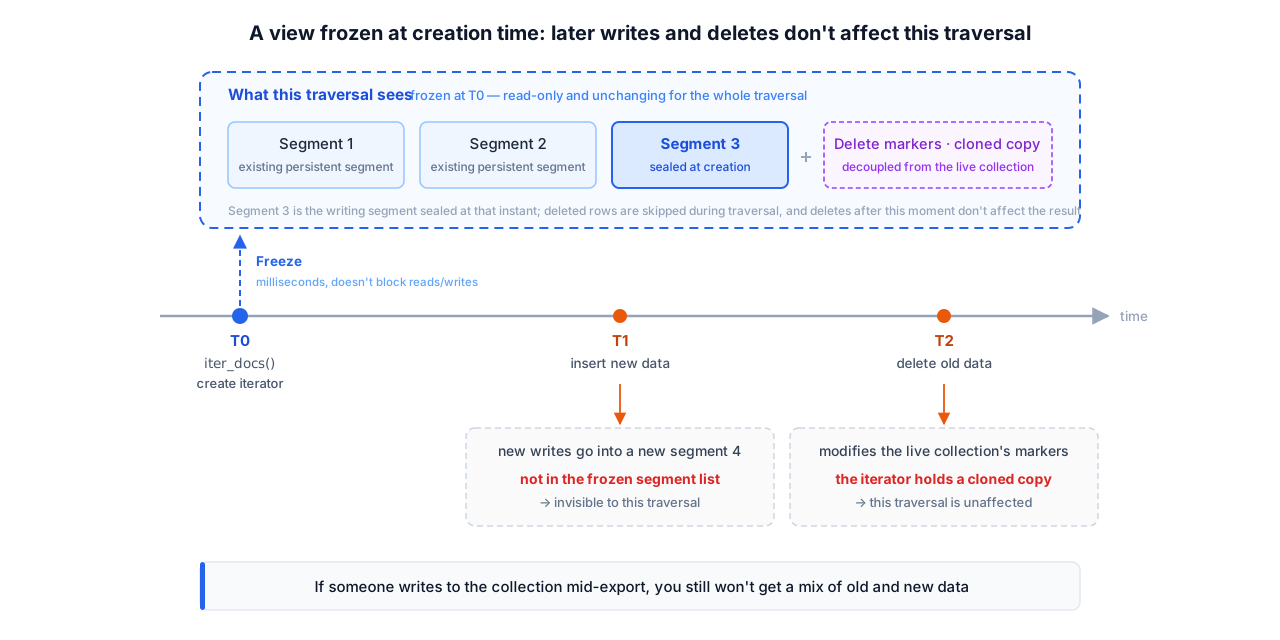
Reads stably: takes a snapshot at creation time. At the moment the iterator is created, the data being written at that instant is included, and the delete bitmap is copied separately. From then on, no matter what writes and deletes happen in the collection, what this traversal sees is the state at the moment of creation. Even if writes to the collection happen during the export, you won't get a mix of old and new data.
Reads frugally: memory is independent of the collection's size. Documents are materialized window by window and handed out one by one; the whole window is released before the next one is materialized.
On top of these three guarantees you can also trim — take only the scalar fields you need, or skip vectors:
with collection.iter_docs(
    output_fields=["title", "score"],  # take only these scalar fields; the primary key is always returned
    include_vector=False,              # default True; turning it off is faster when vectors aren't needed
) as docs:
    for doc in docs:
        ...
Trimming isn't just about saving fields — it also directly affects speed. Traversing the same 1-million-document, 256-dimensional collection in full once:
| Time | Throughput | |
|---|---|---|
include_vector=True (default) | 4.06 s | 250K docs/s |
include_vector=False | 1.03 s | 970K docs/s |
The gap comes from vectors: vectors aren't in the forward store file, so fetching them means one extra read from the vector index per document. In export scenarios where vectors aren't required (e.g., you only want to check scalar fields or study the distribution), turning it off is four times faster.
Internal design: trading off between consistency and memory frugality
Traversing a whole collection looks simple, but what it really has to solve is a pair of conflicting demands: this traversal must see a self-consistent view of the data (otherwise the exported collection is broken), yet it can't read the entire collection into memory to achieve that (otherwise a large collection OOMs outright). DocIterator's design revolves around this conflict.
3.1 Consistency: snapshot, not lock
The simplest form of consistency is a big lock — forbid all writes during traversal. But a full export can last from minutes to hours, and locking the whole collection is clearly unacceptable.
Zvec's choice is to take a snapshot at creation time, so traversal no longer has to contend with writes afterward. create_iterator() does four things at the moment of creation:
- If a segment is currently being written and is non-empty, seal it into an immutable persistent segment;
- take the list of persistent segments at this instant;
- deep-copy the delete bitmap;
- record the current schema.
All of this is completed within a brief write lock, taking only milliseconds. From then on: new writes go into a new segment, which isn't in the snapshot's segment list, so the traversal doesn't see them; new deletes modify the original collection's bitmap, while the iterator holds its own cloned copy, unaffected.
One implementation detail is worth mentioning: field validity checking is deliberately placed before sealing. If the user passes a nonexistent field name, the API returns an error immediately, without leaving behind a needlessly sealed segment.
It should be noted that this is not MVCC. Zvec has no multi-version storage, nor does it offer the ability to "go back to any historical point in time" — what it gives is a one-time isolated snapshot, enough to guarantee that a single export's data is self-consistent, but with no promise that you can still read back today's state three days later. For export, backup, and migration scenarios, this guarantee is just enough, and lightweight enough.
A read-only collection takes a simpler route: no sealing, no writing to disk (writing would violate read-only semantics), just including all segments — the one being written included — in the traversal. A read-only collection has no concurrent writes to begin with, so the view is naturally stable.
3.2 Memory frugality: three-level laziness + windowed materialization
The snapshot solves consistency, but what it captures is the list of segments, not the data inside the segments — the data is still read as the traversal proceeds. Here DocIterator practices three levels of "not taking more than needed":
- Segment level: only one segment's reader is open at any moment; once that segment is read, it's closed before the next one is opened. At any instant at most one segment's files are open;
- Column level: a batch of data read from a segment is in Arrow's columnar format, and when converting it into Documents it's processed by column, which is more efficient than processing row by row; vectors aren't in the forward store, so they're fetched from the vector index by in-segment row number when needed;
- Window level: when converting a batch into Documents, it's done by window, one window being at most 4096 rows (
kMaxRecordBatchNumRows); this window is handed to the user and released before the next window is converted.
So at any moment only one window is actually materialized into Documents; the iterator's own memory overhead is constant and does not grow with the collection's size. Traversing a 1-million-document, 256-dimensional collection in full, taking only scalar fields, keeps the memory delta flat throughout (measured to be stable at 1.3 MB, regardless of whether 200K or 1M documents have been read).
If you take vectors as well, you'll see RSS climb steadily throughout the traversal in your monitoring. This doesn't contradict the above — it's two different layers of memory: the Documents the iterator materializes on the heap are always just one window; whereas vectors live in the vector index file, accessed via memory mapping (mmap) by default, and reading vectors one by one during traversal successively touches the pages they reside on, and these pages stay in RSS as file cache. It's managed by the operating system and reclaimable under memory pressure — it isn't the iterator hoarding data on the heap.
In one sentence: memory frugality means the iterator's own resident overhead stays fixed at one window. A full export with vectors inevitably has to read every vector once, and that part is the sheer volume of the data itself, independent of which API you use; when exporting only scalars, using include_vector=False brings you back to that flat line.
3.3 Can the collection still be used during traversal?
The snapshot guarantees the traversal isn't disturbed by writes; conversely, will the traversal hold up other operations? The answer falls into two categories:
| Operation while an iterator is open | Behavior |
|---|---|
| insert / upsert / update / delete | ✅ Normal (new writes are invisible to this traversal) |
| query / fetch / stats | ✅ Normal |
| flush | ✅ Normal |
| create_index / drop_index add_column / alter_column / drop_column | ❌ Errors out immediately |
| optimize | ❌ Errors out immediately |
| destroy / close | ❌ Errors out immediately |
| Creating another iterator | ✅ Allowed; multiple iterators can coexist |
In a nutshell: writes and queries are completely unaffected; only maintenance operations that change the collection's structure (altering schema, optimizing, destroying) are blocked. The reverse holds too — when a maintenance operation is in progress, create_iterator() errors out immediately rather than queuing to wait.
Using "error out immediately" rather than "block and wait" here is intentional: a traversal may stay open for minutes, and having DDL wait on it would mean letting a maintenance operation be held up indefinitely by a traversal that ends at an unknown time. Failing immediately changes no state; the caller just closes the iterator and retries — which is also why with is recommended in Python: it guarantees the traversal is closed promptly on any path — normal completion, early break, or a mid-way exception — so it won't block maintenance operations for a long time because someone forgot to close it.
SDK usage
DocIterator offers consistent semantics across multiple languages.
Python is the most concise; the object returned by iter_docs() is both an iterator and a context manager:
# Traverse directly
for doc in collection.iter_docs():
    process(doc.id, doc.fields, doc.vector("embedding"))

# Use with for early termination, ensuring prompt release
with collection.iter_docs(include_vector=False) as docs:
    for doc in docs:
        if enough(doc):
            break
Merging multiple collections is a typical combination — streaming on the read side, batching on the write side (single-write cap of 1024 documents):
from itertools import islice

with src.iter_docs() as docs:
    for batch in iter(lambda: list(islice(docs, 1000)), []):
target.insert(batch)C++'s next() returns three states, clearly distinguishing an error from "reached the end":
IteratorOptions options;
options.output_fields_ = {"title", "score"};
options.include_vector_ = false;

auto it = collection->create_iterator(options).value();
while (true) {
  auto r = it->next();
  if (!r.has_value()) {             // error: r.error() has the specific reason; handle it
    std::cerr << r.error().message() << std::endl;
    return 1;
  }
  if (r.value() == nullptr) break;  // traversal finished
  const Doc::Ptr &doc = r.value();
  // doc->pk(), doc->get<std::string>("title"); include_vector_=false, so the doc carries no vectors
}
it->close();  // explicit release on early termination; also released automatically when leaving scope
Returning an error explicitly rather than silently skipping on failure is especially important for full traversal: a single traversal may involve tens of millions of documents, and silently skipping means you get an incomplete dataset without ever knowing it.
The C API corresponds to zvec_collection_create_iterator() / zvec_doc_iterator_next() / zvec_doc_iterator_close(), with exactly the same semantics.
For languages such as Node.js, see the official API reference at https://zvec.org/en/api-reference/.
Zvec Studio: turning traversal into a GUI operation
Beyond the command line, Zvec Studio (Zvec's desktop management tool) builds a GUI-based data export on top of DocIterator, complemented by import and whole-collection migration. Enter any collection and switch to the Import / Export tab.
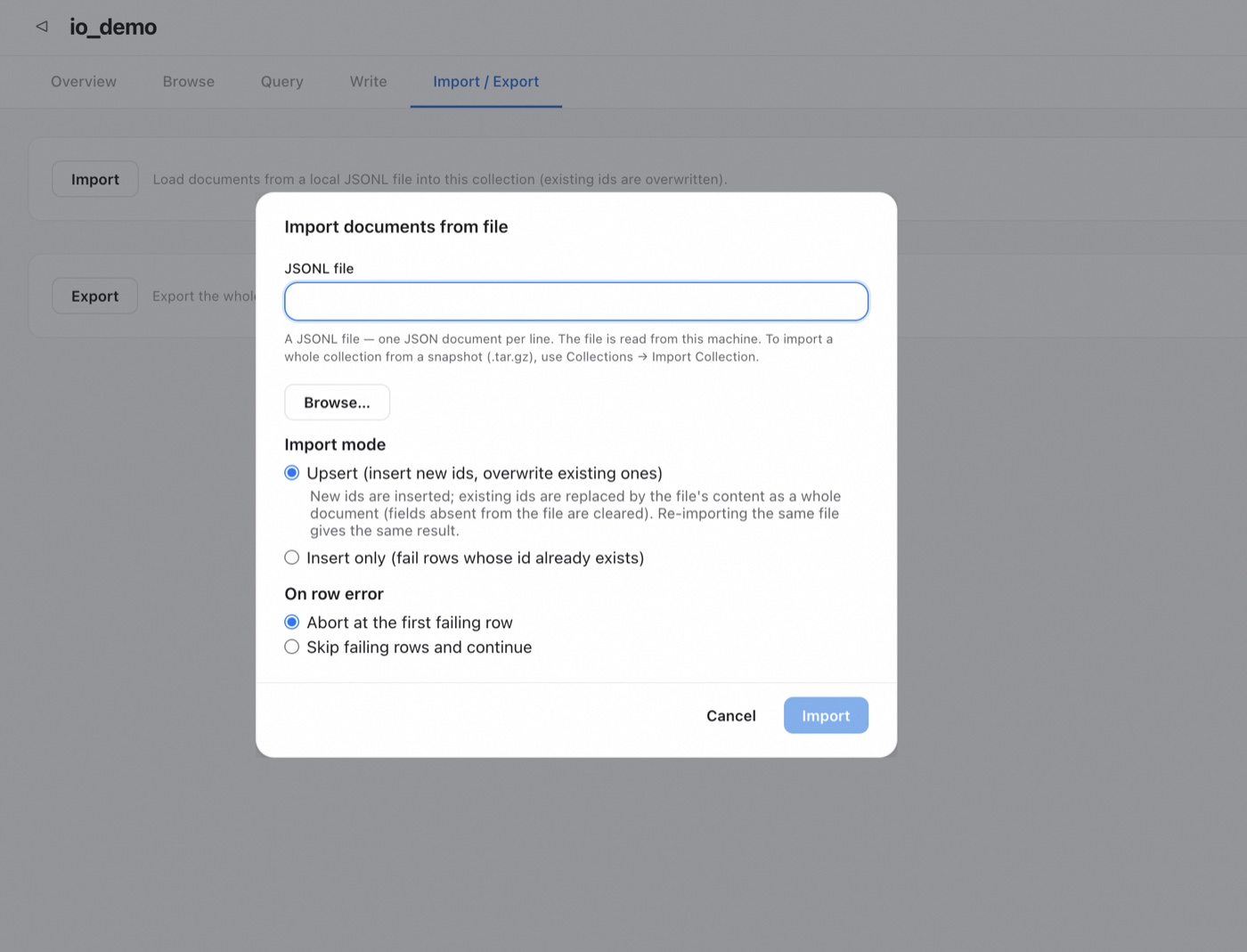
Import: reads a local JSONL and writes it in batches, returning a line-by-line report. Two modes (Update updates documents with the same primary key / Insert only writes only new primary keys), and two error policies:
skip: skip bad lines and continue; success count + failure count = total lines, so one bad line won't drag down the whole import;abort: stop at the first failing line, and rows already written are rolled back, leaving no "half-imported" collection behind.
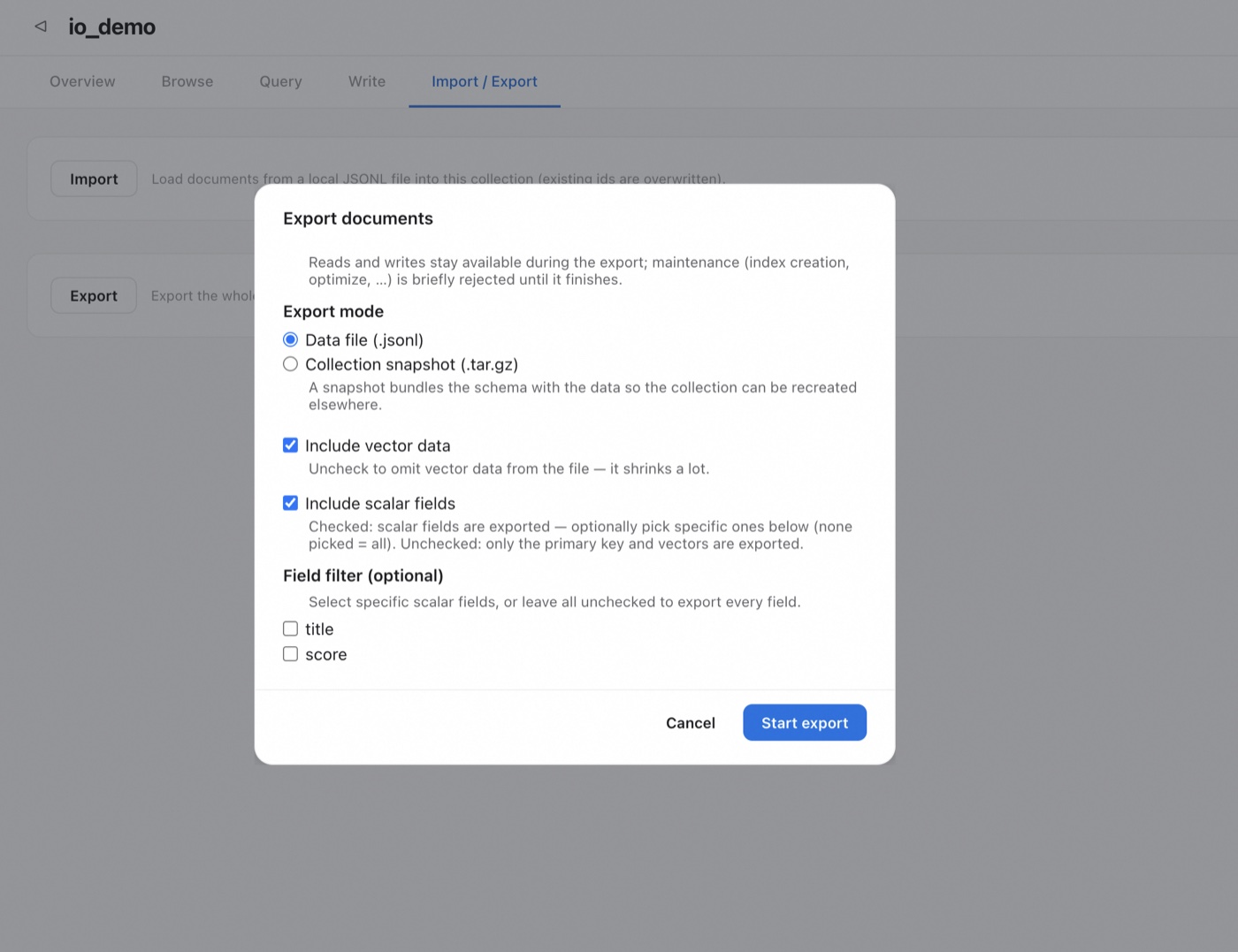
Export: the entire collection is downloaded as JSON Lines in a stream, with a timestamp built into the filename. You can choose whether to include vectors, whether to include scalar fields, or to export only specified fields. The export is streamed throughout, so the amount of data exported doesn't affect memory usage.
Whole-collection migration: choose snapshot mode at export time, and the complete schema and data are packaged together into a .tar.gz. On another machine, importing the collection rebuilds it entirely — a schema pre-check is done before writing (a mismatch lists the differences and rejects the import), renaming is supported, and it's all-or-nothing: if something goes wrong midway or any line fails, the newly created collection is rolled back and the first offending line is pointed out.
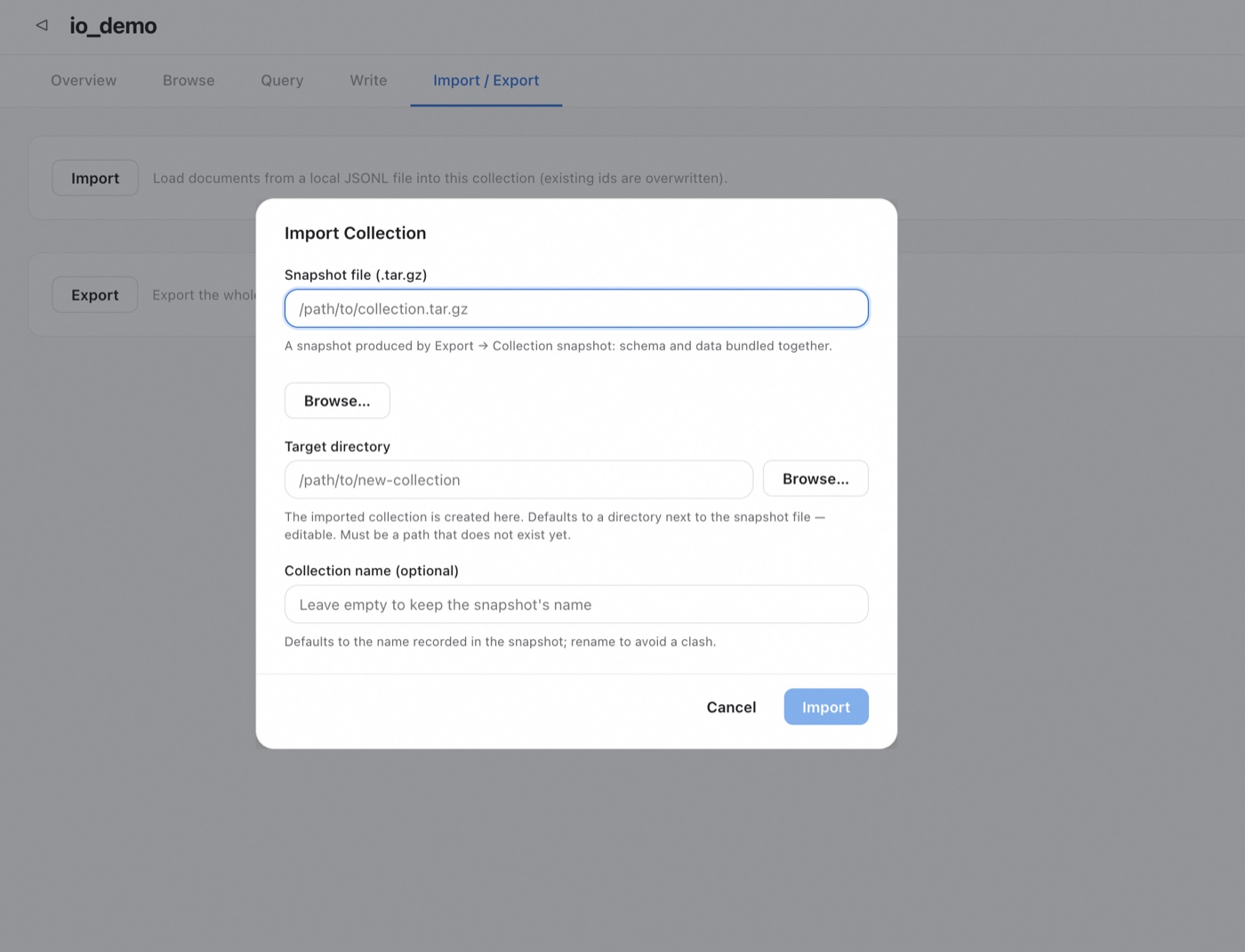
The scenarios from the opening can all be realized by now: each machine exports its own snapshot, and you copy them together and rebuild one by one; or merge the JSONL first, then import it all at once. These capabilities also have corresponding HTTP interfaces, convenient for wiring into automated pipelines.
Boundaries and caveats
- Consistency is a one-time snapshot, not MVCC: suitable for a single complete export / backup / migration, not to be treated as a revisitable historical version;
- Traversal and maintenance operations are mutually exclusive: while an iterator is open, altering schema, optimize, destroy, and close will error out. A long-held iterator will block these operations, so close it when done (
withis the safest in Python); - On a writable collection, creating an iterator may seal a segment: frequently creating iterators accumulates many small segments; merge them with
optimize()when needed; - The export format is currently JSON Lines: other formats (e.g., producing Parquet directly) are not yet available.
Summary
The value of a vector database lies not only in searching accurately, but also in data being able to "come in and go out." Zvec v0.7.0's DocIterator turns "reading out a collection in full" into an engine API with clear semantics:
- Reads everything — covers the whole collection, exports vectors on demand, and misses not a single document;
- Reads stably — takes an isolated snapshot at creation time, the traversal's data is self-consistent, at a cost of only a millisecond-level seal, without blocking concurrent reads and writes;
- Reads frugally — three-level laziness + windowed materialization, peak memory independent of collection size.
On top of this, Zvec Studio turns export into a GUI and complements it with import and whole-collection migration, making "moving data around" convenient for both command-line and GUI users.
If your data is stuck being "searchable but not movable," upgrade to v0.7.0 and use iter_docs(); if you prefer a GUI, use Studio's Import / Export directly.
Zvec is open-sourced under the Apache 2.0 license — try it, give feedback, and contribute.
GitHub: https://github.com/alibaba/zvec
Docs: https://zvec.org