Zvec on Mobile: On-Device Intelligent Photo Search
Zvec is a lightweight embedded vector database designed for on-device scenarios. It offers four core advantages: ready-to-use integration, configurable resource usage, high performance, and a diverse set of vector capabilities. In version 0.4.0, Zvec added mobile support with a Dart/Flutter SDK, supporting Android arm64-v8a and iOS arm64.[0]
Over the past year, AI has been moving noticeably closer to mobile devices. Apple Intelligence has brought “personal context” into the system-level AI narrative for iPhone, iPad, and Mac. Google Gemini Live has also introduced camera and screen sharing into mobile AI experiences, allowing models to converse around the real-world scene or screen content the user is currently seeing.[1][2]
These changes point to the same trend: mobile AI is no longer just a chat entry point. It is becoming more closely tied to the device, context, and task at hand. And once AI starts participating in real tasks, it inevitably needs to deal with the local data on a user’s phone: a screenshot, an email, photos and notes from a trip, or the context an Agent needs for its next step.
This local data is scattered across photos, messages, emails, notes, files, and third-party apps. At the same time, it is inherently privacy-sensitive and should not leave the device casually.
That is why we believe mobile AI applications need a layer of local retrieval capability that can be embedded directly into the app. It should handle indexing, recall, filtering, and ranking on the device, and serve both users and Agents when needed.
Zvec 0.4.0’s mobile support is built to address this need: enabling applications to implement local retrieval capabilities on Android and iOS devices.
Zvec: Retrieval Infrastructure for On-Device Applications
In mobile scenarios, Zvec serves as the app’s internal local retrieval layer. The application turns local data into searchable indexes, and queries are executed on the device without deploying a remote vector database.
Around this local data, Zvec can support semantic vector retrieval, scalar filters, FTS, hybrid recall, and fusion ranking, enabling apps to organize on-device data into local context that can be queried, filtered, and combined.
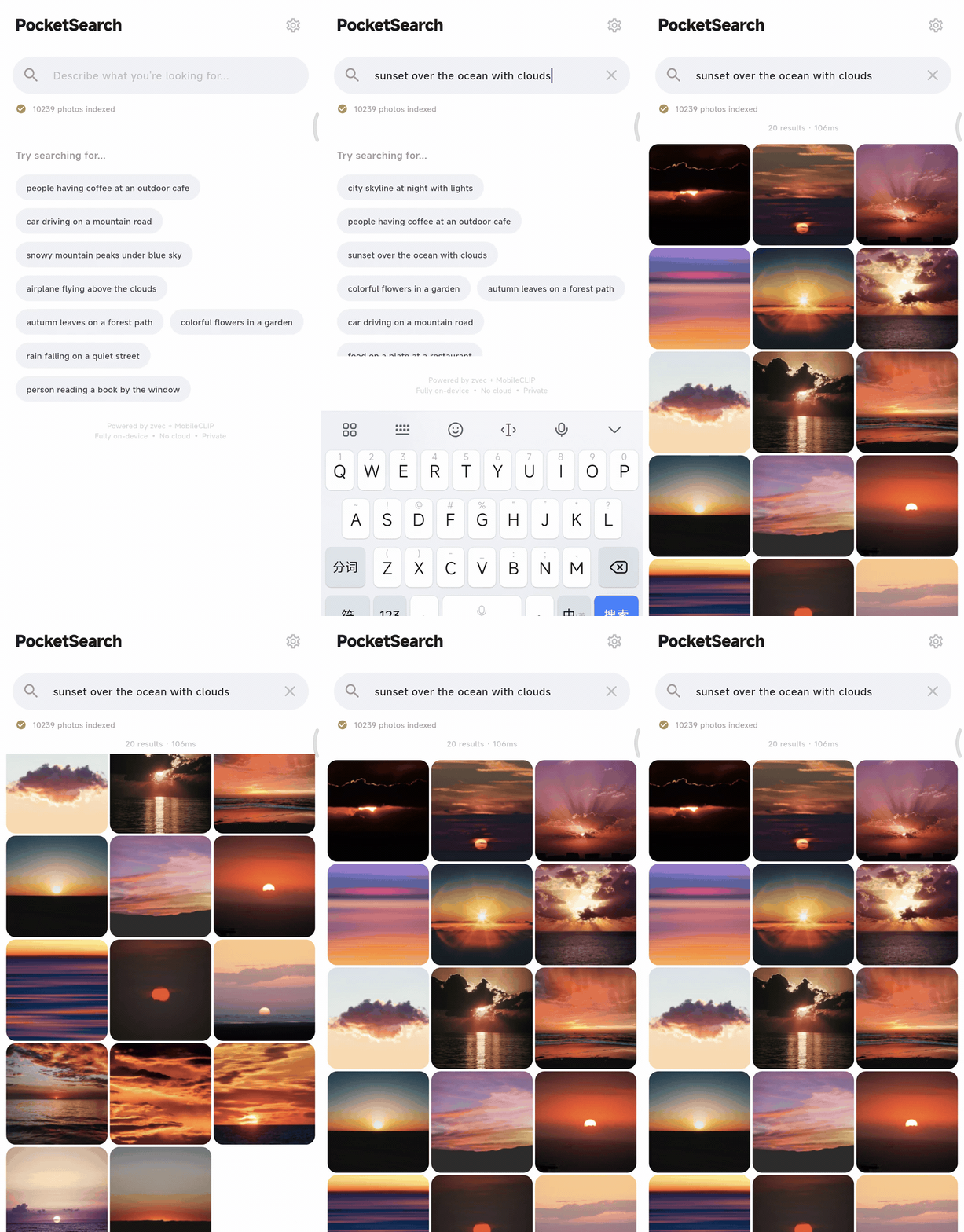
To validate this direction, we built PocketSearch.[3]
The
10K+local photo gallery used in the demo and tests in this article was constructed from the public Unsplash Lite dataset as a phone photo library. It does not contain any user’s private personal photos.[6]
PocketSearch: Starting with Photos
PocketSearch is an early product prototype for on-device personal data search. It currently supports Android and iOS, and users can install it on real devices to try it out. Its long-term vision is to let users search photos, notes, messages, emails, files, and more third-party app data on their phones with a single entry point, while also providing Agents with a unified local context retrieval interface.
We chose photos as the first stop because the photo library is often one of the largest and fastest-growing data sources on a phone, and it has long been more than just “photos taken by the camera.” Screenshots, receipts, QR codes, ID documents, whiteboards, chat screenshots, and all kinds of temporarily saved images turn the photo library into a highly information-dense personal data entry point that is difficult to organize by filenames or categories.
What users remember is often not the exact time, but “what was in the image” or “what the image was used for.” PocketSearch lets users describe a photo directly in natural language, such as boarding pass screenshot, whiteboard notes about search architecture, or receipt from a coffee shop, and then returns relevant images locally on the phone. This process does not rely on users manually organizing their photo library in advance, nor does it require uploading photos to the cloud. Keywords, tags, OCR, and other signals can still participate as additional retrieval paths rather than being excluded.
The current version includes two key paths. During offline indexing, images are encoded into embeddings on the device and written into a local Zvec index. During search, the user’s text query is encoded into the same vector space, and Zvec performs local recall and returns the results.
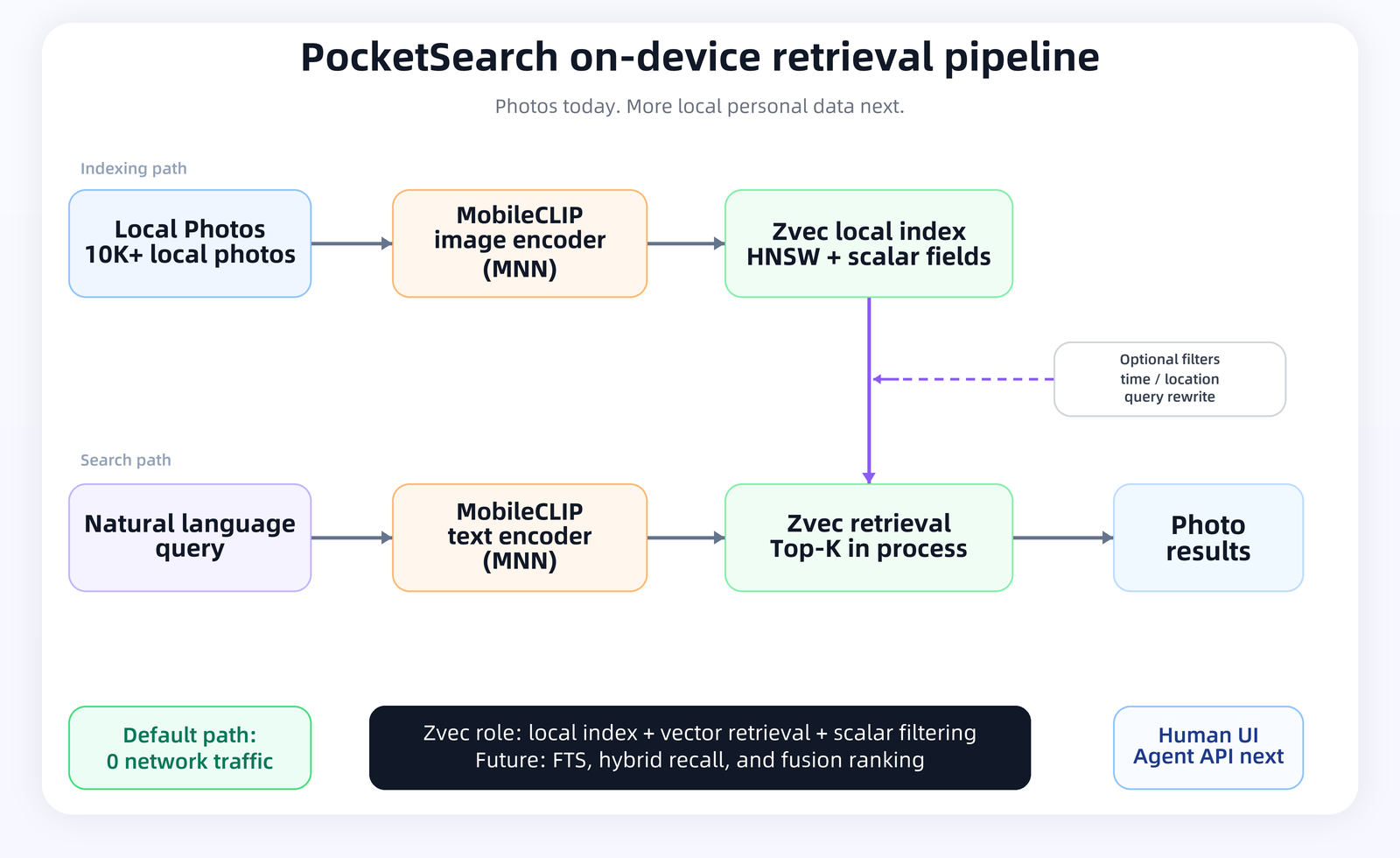
In this pipeline, MobileCLIP maps images and text into the same vector space, while Zvec handles local indexing and recall.[4]
The Key to On-Device Experience: Light, Fast, and Offline
The current version has been installed and launched successfully on real devices, including a Xiaomi 14 Ultra running Android 15 and an iPhone SE 3. On the Xiaomi 14 Ultra, we used a release build to index and search 10,239 local test images. The performance and resource data are as follows:
A search takes about 117-131 ms from query input to returned results, with Zvec local recall taking around 1 ms. In this pipeline, most of the latency comes from text embedding computation; retrieval itself is not the bottleneck for the user experience.
The default search path does not need network access. Images, vectors, and photo metadata all stay on the device. MobileCLIP computes embeddings locally through MNN, and Zvec performs indexing and recall locally.[4][5]
Resource usage is also clear. Looking only at the Zvec index, 10,239 images correspond to about 24.0 MB of index files and about 37.0 MB of runtime memory delta. The raw embedding data itself is about 20.0 MB (10,239 × 512 × 4 bytes), while the rest comes from the vector index structure and field storage.
The 875 MB shown in the table is the memory usage reference for the entire PocketSearch app after it is running, not Zvec alone. This number also includes:
- On-device models and the MNN runtime: the current version loads both the MobileCLIP image encoder and text encoder, which account for the largest share of overall memory usage.
- The Flutter app and image processing pipeline: including UI runtime, photo library access, thumbnail loading, image preprocessing, and result rendering.
- The Zvec local index: including image embeddings, the vector index structure, and scalar fields used for filtering.
In other words, while the overall memory usage of the current version may look high, it mainly comes from “resident models + the full app pipeline,” not a single Zvec query itself. In a real product, resource usage can continue to be controlled through model selection, lazy loading, and index lifecycle management.
This matters for mobile AI applications. On-device scenarios are usually not just about whether something can run. They also depend on whether it is fast enough, whether it can work offline, whether resource usage can be controlled, whether server dependencies can be reduced, and whether the system is suitable for privacy-sensitive data. For personal photos, notes, emails, and messages, what users care about is not only “how the server protects my data,” but also “whether this data can stay on my device.”
From Query Understanding to Hybrid Recall
The current version of PocketSearch first validates the main path of “image embeddings + local vector recall.” On top of that, photo search has two natural directions for evolution: one is to make queries better express user intent; the other is to organize more information from the photo library into the local index.
Query rewrite has already been integrated into the current version as an optional capability. Users do not always enter a simple visual phrase. They often mix “visual content, time, and location” in one sentence, for example:
buildings I photographed in Beijing last summer
With query rewrite enabled, PocketSearch rewrites this kind of expression into a more retrieval-friendly structured form:
{
  "visual": "buildings and architecture in Beijing",
  "date_start": "2025-06-01",
  "date_end": "2025-09-01",
  "geo": {
    "lat_min": 39.4,
    "lat_max": 41.1,
    "lng_min": 115.4,
    "lng_max": 117.5
  }
}
Here, visual goes into vector recall, while date_start / date_end and geo are converted into Zvec scalar filters. This allows PocketSearch to combine visual content recall with time and geolocation filtering.
This capability is disabled by default. In the default mode, PocketSearch remains a purely on-device and fully offline search pipeline.
Another direction still in progress is to put more searchable information into the local index. System metadata or EXIF metadata such as time and location can be read directly. But photo libraries also contain many screenshots, receipts, menus, chat screenshots, and QR codes, and visual embeddings alone cannot cover all of this information. Turning these contents into searchable information often requires models such as OCR, captioning, classification, and entity extraction.
In the future, system metadata, OCR text, visual tags, entities, and other information can be written into the local index, combined with FTS, vector retrieval, and other recall paths, and then organized through fusion ranking. At that point, photo search is no longer just visual similarity search. It becomes closer to on-device context retrieval.
From Photos to On-Device Context
The photo library is only the first data source connected to PocketSearch.
As the system expands to notes, emails, messages, files, and more third-party app data, each type of data will need a different ingestion path: some require text extraction, some require OCR, and others require embeddings, metadata reading, or entity extraction.
But once the data enters the retrieval layer, the problems become similar: how to organize this information into queryable local indexes, how to perform recall, filtering, and ranking on the device, and how to provide both the user-facing search entry point and the Agent interface with structured, traceable results.
In PocketSearch’s architecture, Zvec organizes the embeddings, text, and metadata produced by upstream models and system APIs into local indexes, and performs recall, filtering, and ranking at query time. As the data sources continue to expand, the upstream parsing methods will change, but Zvec’s role in the retrieval layer remains stable.
If you are also working on mobile AI, on-device RAG, local memory, or privacy-sensitive search, take a look at Zvec and PocketSearch.
References
- [0] Zvec: https://github.com/alibaba/zvec
- [1] Apple Intelligence: https://www.apple.com/newsroom/2024/06/introducing-apple-intelligence-for-iphone-ipad-and-mac/
- [2] Gemini Live camera and screen sharing: https://blog.google/products-and-platforms/products/gemini/gemini-app-updates-io-2025/
- [3] PocketSearch: https://github.com/feihongxu0824/PocketSearch
- [4] MobileCLIP: https://github.com/apple/ml-mobileclip
- [5] MNN: https://github.com/alibaba/MNN
- [6] Unsplash Lite Dataset: https://unsplash.com/data